
确认报错日志
在操作之前,请先确认 Plex 日志中的报错内容与以下示例类似,尤其包含 truehd_eae 和 EAE timeout! EAE not running, or wrong folder? 等信息。
May 28, 2024 06:46:44.000 [139632948570936] ERROR - [Req#184/Transcode/ipb4thtpwg71j3z4nigp75k7/96a2561c-30bb-4885-98ae-ad63e3290f89] [truehd_eae @ 0x7f9ed3441940] EAE timeout! EAE not running, or wrong folder? Could not read ‘/tmp/pms-20fb6ae1-5ba6-429b-b623-0b0dc443f00b/EasyAudioEncoder/Convert to WAV (to 8ch or less)/ipb4thtpwg71j3z4nigp75k7_373-0-0.wavMay 28, 2024 06:46:44.001 [139632892279608] ERROR - [Req#196/Transcode/ipb4thtpwg71j3z4nigp75k7/96a2561c-30bb-4885-98ae-ad63e3290f89] [truehd_eae @ 0x7f9ed3441940] error reading output: -5 (I/O error)May 28, 2024 06:46:44.001 [139632885189432] ERROR - [Req19b/Transcode/ipb4thtpwg71j3z4nigp75k7/96a2561c-30bb-4885-98ae-ad63e3290f89] Error while decoding stream 0:1: I/O error只有当你的日志与上面报错类型一致时,下面的方法才是对应的解决方案。
编辑 sysctl.conf 配置
-
使用 SSH 登录到运行 Plex 的那台机器。
-
执行以下命令切换到 root:
sudo -i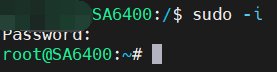
-
使用编辑器打开
/etc/sysctl.conf文件,这里以vim为例:vim /etc/sysctl.conf -
在文件末尾加入以下一行(如果已有此项,可以根据需要调整数值):
fs.inotify.max_user_watches=524288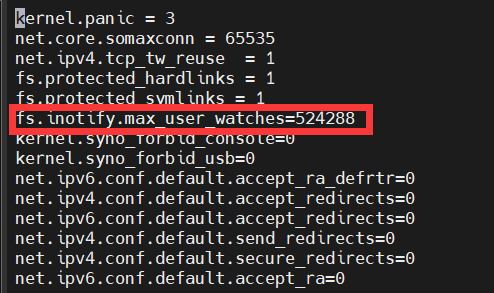
说明:
fs.inotify.max_user_watches控制系统能同时监控的文件数量,Plex 在大量媒体库、转码缓存等场景下可能会触及默认限制,导致类似 EAE timeout 的问题。适当增大该值可缓解此类错误。
重启系统并验证
-
保存并退出编辑器后,执行重启命令:
reboot -
系统重启后,重新打开 Plex,尝试之前会触发错误的媒体播放 / 转码任务:
- 如果设置生效,硬件转码应可以正常工作;
- 如仍有问题,可再次查看日志,确认是否依旧为同类错误,或为其他新的报错。
参考文献
- [1] flathub, Visual Studio Code is unable to watch for file changes in this large workspace” (error ENOSPC) #29, GitHub (2018). https://github.com/flathub/com.visualstudio.code/issues/29.


